How to inventory every tool in your garage (with one photo)
Short answer
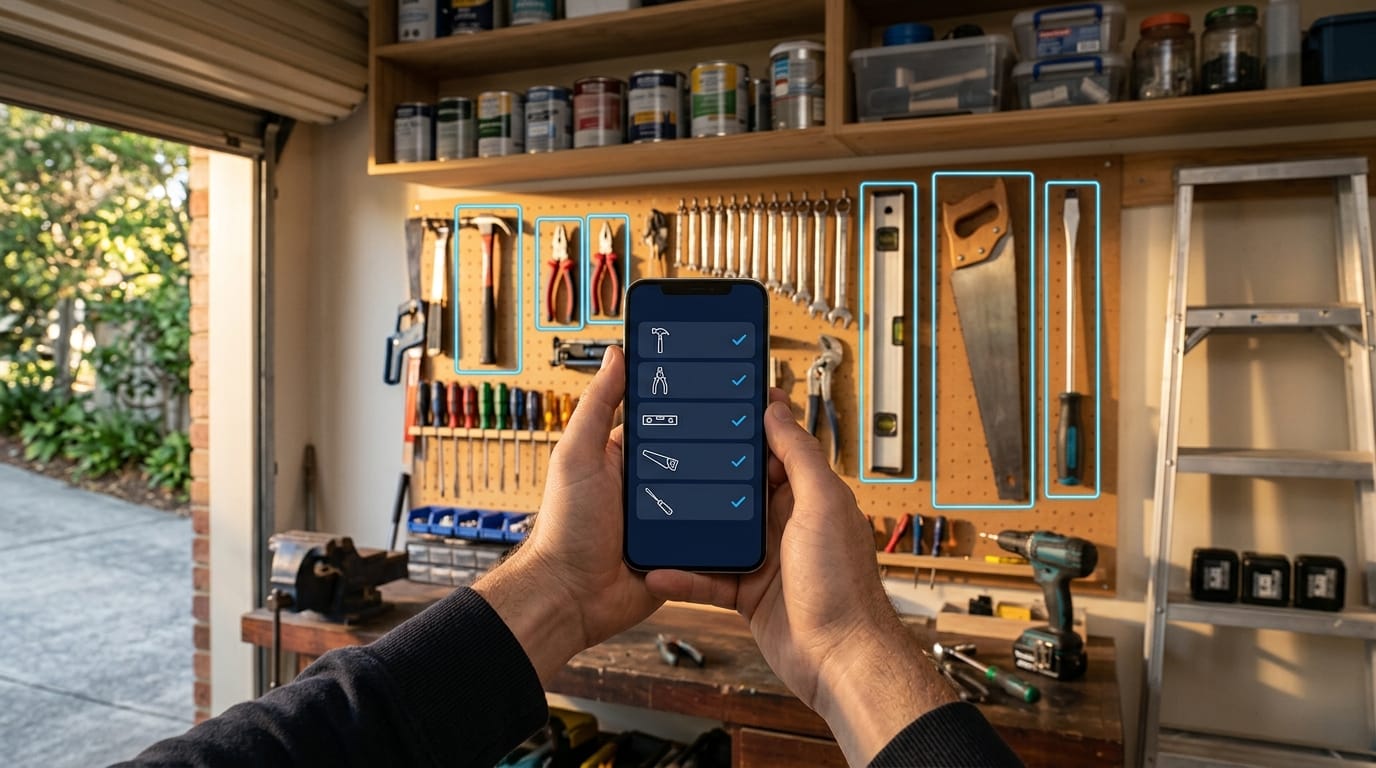
Photograph each wall, shelf and toolbox in your garage, list every tool you can see, and keep that list somewhere you'll check before every hardware run. Doing it by hand takes an afternoon. With Jib's AI Toolbox you take a photo and it lists every tool it can recognise for you to confirm. Every job you plan afterwards checks the list, so you only buy what you're actually missing.
Almost everyone who does DIY has done it: bought a stud finder, a set of hole saws or a second spirit level, got home, and found the first one sitting in the garage. A tool inventory fixes that. Keeping one used to mean a clipboard and a spare afternoon. Now it can be one photo.
This guide covers why a tool inventory is worth having, the old ways to make one, the one-photo way, and a starter checklist of the tools most homes actually need.
Why keep a tool inventory at all?
- You stop buying duplicates. The easiest money you’ll ever save on DIY is the tool you didn’t buy twice.
- You plan jobs properly. Knowing what you’ve got tells you whether a job is a Saturday morning or a Saturday morning plus a trip to the hardware store.
- You can lend (and get things back). A list makes it obvious when the post-hole shovel hasn’t come home.
- It helps if something goes wrong. Garages and sheds are a common target for theft. A record of what you owned, with photos, makes a contents insurance claim far easier to support. Check what your policy covers, since some cap or exclude tools kept in outbuildings.
- Moving house gets easier. You’ll know what’s in the boxes, and what went missing on the way.
The old ways (and why they rarely stick)
| Method | Good for | Why people give up |
|---|---|---|
| Notebook or clipboard | Zero setup | Out of date the first time you buy something |
| Spreadsheet | Serial numbers, prices | Tedious to build, never open when you’re in the aisle |
| Labelled shelves and shadow boards | Finding things fast | Doesn’t tell you what you own when you’re not in the garage |
| Photos in your camera roll | Insurance evidence | Impossible to search: “do I own a jigsaw?” means scrolling 400 photos |
All of these work if you’re disciplined. The problem is the typing: most people’s inventory stalls at the first shelf.
The one-photo way
Jib’s AI Toolbox takes the typing out:
- Open Toolbox in the Jib app and tap Scan your garage, shed or a receipt.
- Photograph a wall, a shelf or an open toolbox. The AI looks at the photo and lists every tool and piece of equipment it can recognise: drills, levels, saws, clamps, ladders, garden tools, safety gear.
- Untick anything it got wrong, then save. The list goes into your Toolbox.
- Repeat for each wall or cabinet. A tool that’s already in your Toolbox under the same name isn’t added twice, and you review every list before it’s saved.
It works on hardware store receipts too. Photograph the docket after a big shop and the tools you just bought go straight in.
What happens after you’ve scanned
This is the part a spreadsheet can’t do. Your Toolbox becomes part of every job you plan:
- Tools needed, already ticked off. When Jib plans a job, it lists the tools it needs and marks the ones in your Toolbox as ones you already have.
- Missing tools go on the shopping list with one tap. Anything you don’t own shows a Buy button, and after a plan Jib offers to add all your missing tools at once.
- Bought it? It’s in your Toolbox. Tick a tool off on your shopping list and it moves into your Toolbox automatically, so no future job asks you to buy it again.
- Pick tools by hand, too. On any job, Add a tool opens your Toolbox as a searchable list, so you can attach exactly what you plan to use.
Tips for a scan that catches everything
- Good light beats a good camera. Open the roller door or switch everything on. Shadows hide small tools.
- One wall or shelf per photo. A tight shot of a pegboard beats a wide shot of the whole garage.
- Open the cases. Drill cases, socket sets and toolboxes photograph best open.
- Stand things up. Tools lying flat on a bench are easier to recognise than tools piled in a tub.
- Use receipts for the small stuff. Drill bits, blades and fixings are easier to capture from the receipt than the shelf.
- Rescan after big changes, like a birthday, a garage clean-out or a big project.
A starter tool checklist for homeowners
Not sure what a well-set-up home toolbox looks like? Here’s a practical baseline for general maintenance and small projects. Tick off what you have, and you’ve got a gap list.
Measuring and marking
- Tape measure (8 m is a good all-rounder)
- Spirit level (600 mm or longer)
- Combination square
- Pencils and a marker
- Stud finder
Hand tools
- Claw hammer
- Screwdriver set (flat and Phillips, plus a stubby)
- Adjustable spanner and a basic socket set
- Pliers: combination, long-nose and locking
- Utility knife with spare blades
- Handsaw
- Putty knife and scraper
- Caulking gun
Power tools
- Cordless drill/driver, with a drill bit and driver bit set
- A second battery and charger
- Jigsaw or circular saw (for timber projects)
- Orbital sander
Access
- Step ladder
- Extension ladder (if you’ll ever clean gutters)
Safety gear
- Safety glasses
- Hearing protection
- Dust masks (P2 for sanding and dusty work)
- Work gloves
Garden
- Spade and shovel
- Rake
- Pruning secateurs and loppers
- Wheelbarrow
Keep the evidence (insurance)
For higher-value power tools, it’s worth keeping more than a name:
- Photograph the tool and its serial number plate.
- Keep receipts, or a photo of them.
- Store copies somewhere other than the garage.
Jib keeps your Toolbox in the cloud when you’re signed in, alongside your job photos, so the record survives even if the garage doesn’t. Always check your own policy’s rules for tools and outbuildings.
Frequently asked questions
Does it need an internet connection? Yes, for the AI scan. Your Toolbox list itself is saved on your phone and synced to your account.
Can I add tools by hand? Yes. Type any tool into Toolbox, or add one from any job’s Tools section.
What about paint, screws and other materials? The Toolbox is for reusable tools and equipment. Consumables live in each job’s Materials list and your shopping list.
Is the AI Toolbox free? It’s part of Jib’s paid plans, which come with a free trial. The rest of Jib (rooms, jobs, reminders and photos) is free.
This guide is general information, not legal or professional advice. Rules differ between states, councils and individual properties, and they change. Confirm with your state regulator or council before starting work, and if in doubt, get a licensed tradesperson.